Boomerang
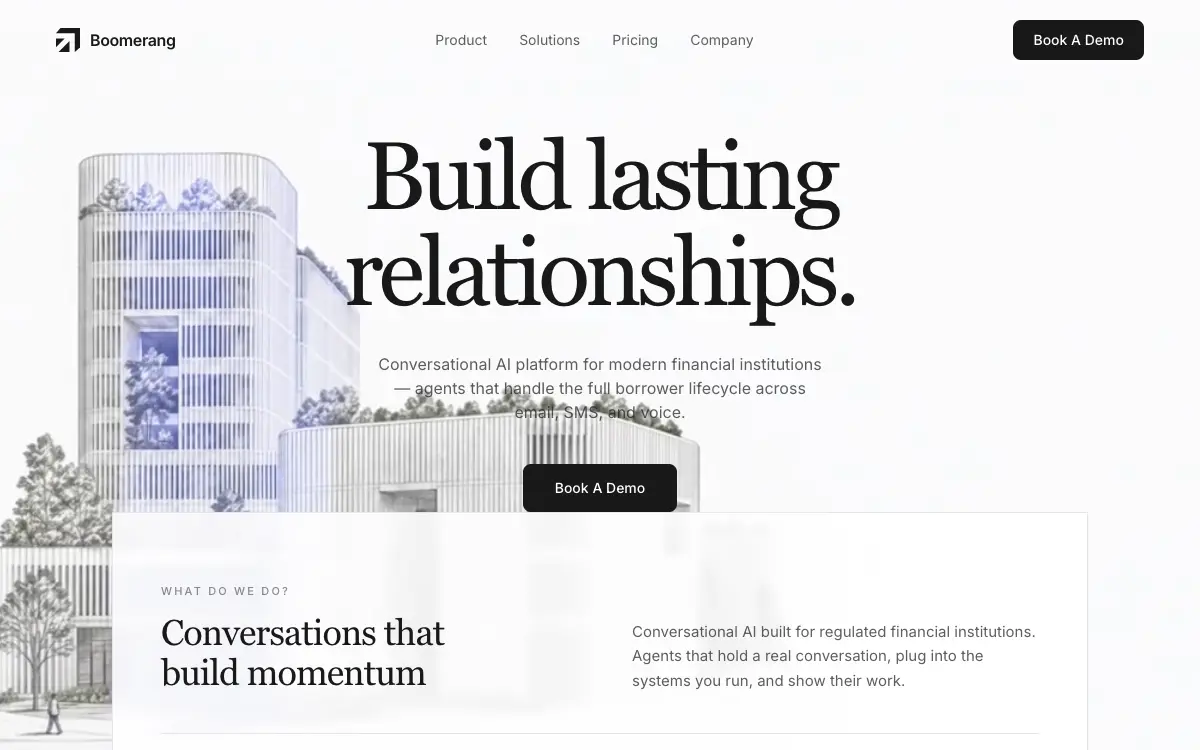
Single-viewport landing for a financial-services conversational AI: a full-bleed clip captured frame by frame and replayed forward-then-reverse on canvas, under a serif headline and a bottom-anchored "What do we do?" panel.
Prompt-nya
# Boomerang — Conversational AI for Financial Institutions

Build a single full-viewport marketing landing page for **Boomerang**, a conversational AI platform for financial institutions. The whole page is one screen: fixed navbar, a full-bleed video background that plays forward then reverses forever, a centred headline block, and a "What do we do?" panel anchored to the bottom of that same first viewport.

Reproduce this exactly. Same copy, same hex values, same class names, same fonts, same video URL, same capture-to-canvas boomerang technique. Do not invent extra sections, stat strips, floating badges, testimonials, or a footer. No purple. No hero cards.

## 1. Stack

- **Vite + React + TypeScript + Tailwind CSS**
- **`lucide-react`** — `ArrowRight` and nothing else
- No other UI libraries, no animation libraries, no routing. One `App`.

## 2. Fonts (exact)

Load both in `index.html`:

```html
<link rel="stylesheet" href="https://db.onlinewebfonts.com/c/9d4d074c9335825a23cce178ee03b498?family=P22+Mackinac+W01+Book" />
<link rel="stylesheet" href="https://fonts.googleapis.com/css2?family=Inter:wght@300;400;500;600&display=swap" />
```

Tailwind `theme.extend.fontFamily`:

```js
sans: ['Inter', 'sans-serif'],
serif: ['P22 Mackinac W01 Book', 'Georgia', 'serif'],
```

Body:

```css
body {
  font-family: 'Inter', sans-serif;
  -webkit-font-smoothing: antialiased;
  -moz-osx-font-smoothing: grayscale;
}
```

Document title: `Build Lasting Relationships`. Page background: pure white `#FFFFFF`. Primary text and chrome: `#191919`.

## 3. Video (use this URL exactly, nowhere else)

```
https://d8j0ntlcm91z4.cloudfront.net/user_38xzZboKViGWJOttwIXH07lWA1P/hf_20260715_090628_7052d8a6-a094-4341-a4a2-ad58493a67a9.mp4
```

The clip is a high-key architectural render: a pale office tower and low block resolving out of near-white paper, drawn in fine pencil with blue-violet glazing. It reads as a very light, almost white frame — which is why the page's type is near-black and sits directly on it with no scrim.

## 4. `BoomerangVideoBg` — the page's only real motion

An absolute full-bleed background, `absolute inset-0 z-0`.

1. Wrapper: `scale-[1.15] origin-top overflow-hidden` — slightly oversized, anchored from the top.
2. Capture `<video>`: `src` = the CloudFront URL above, `muted`, `playsInline`, `preload="auto"`, `crossOrigin="anonymous"`, `className="w-full h-full object-cover object-top"`.
3. On load, play **once** — no native `loop`. While it plays, capture every frame to offscreen canvases. Prefer `requestVideoFrameCallback`; fall back to `requestAnimationFrame`. Cap capture width at **960px** and scale height proportionally. Deduplicate by `currentTime` — both callbacks fire more than once on the same decoded frame.
4. On `ended`: stop capturing, keep the frames, and switch from the video to a display `<canvas>` (`w-full h-full object-cover object-top`).
5. Canvas playback: ping-pong at **30fps** (`interval = 1000 / 30`). Advance the frame index forward to the last frame, then reverse to the first, forever.
6. Until the frames are ready, show the live video. Once ready, hide the video (`display: none`) and show the canvas.

That soft forward→reverse loop behind the hero is the point of the page.

## 5. Logo (exact SVG)

A custom mark, not a Lucide icon. `viewBox="0 0 256 256"`, `fill="currentColor"`, three paths:

```
M 144 256 L 27.598 256 L 144 139.598 Z
M 256 207.5 L 200 256 L 200 56 L 0 56 L 48 0 L 256 0 Z
M 0 204.402 L 0 112 L 92.402 112 Z
```

In the navbar: `w-6 h-6 text-[#191919]`. Wordmark beside it — “Boomerang”, `font-semibold text-base tracking-tight text-[#191919]` — with gap `2.5`.

## 6. Fixed navbar

- `fixed top-0 left-0 right-0 z-50`
- `px-6 sm:px-10 md:px-14`, `py-4 sm:py-5`
- Three zones: logo left | centre links (hidden below `md`) | CTA right
- Links: **Product**, **Solutions**, **Pricing**, **Company** — `text-sm text-[#191919]/70`, hover to full `#191919`, `transition-colors duration-200`, hrefs `#product` `#solutions` `#pricing` `#company`
- CTA: **Book A Demo** — `px-5 py-2.5 bg-[#191919] text-white text-sm font-medium rounded-lg hover:bg-[#191919]/90 transition-colors duration-200`
- No nav background, no blur, no border. It sits transparent over the video.

## 7. Hero section — the first viewport

`relative flex flex-col items-center overflow-hidden h-screen`. Video background at `z-0`, content at `z-10`.

**Copy block**, centred:

- `pt-24 sm:pt-26 md:pt-32`, `px-4 sm:px-6`
- H1, serif: `Build lasting` + `<br />` + `relationships.`
  `font-serif text-4xl sm:text-5xl md:text-7xl lg:text-8xl leading-[1.1] tracking-tighter text-[#191919] font-normal`
- Subcopy: `max-w-sm sm:max-w-md`, `mt-5 sm:mt-6 md:mt-8`, `text-sm md:text-base text-[#191919]/70 leading-relaxed`

  > Conversational AI platform for modern financial institutions — agents that handle the full borrower lifecycle across email, SMS, and voice.

- Second **Book A Demo** button: `mt-6 sm:mt-8 md:mt-10 px-6 sm:px-8 py-3 sm:py-3.5`, otherwise the same black pill as the nav CTA.

**Bottom info panel** — `mt-auto`, so it sits on the bottom edge of the viewport:

- Outer: `w-full max-w-5xl px-4 sm:px-6`
- Card: `bg-white/90 backdrop-blur-sm border border-gray-200 border-b-0 pt-8 sm:pt-12 md:pt-16 px-5 sm:px-8 md:px-12 pb-0 shadow-sm` — flush to the bottom, no bottom border, no radius.

**Row 1 — two columns** (`md:grid-cols-2`, gaps `6 / 8 / 16`):

- Left: micro-label `WHAT DO WE DO?` — `text-[11px] uppercase tracking-[0.2em] text-[#191919]/50 font-medium`. Then an H2, serif: `Conversations that` / `build momentum` — `mt-3 text-2xl sm:text-3xl md:text-4xl font-serif font-normal leading-tight tracking-tight`, with the line break active from `sm` up.
- Right: body copy, bottom-aligned — `text-sm md:text-[15px] text-[#191919]/70 leading-relaxed`

  > Conversational AI built for regulated financial institutions. Agents that hold a real conversation, plug into the systems you run, and show their work.

**Hairline divider:** `mt-6 sm:mt-8 md:mt-10 h-px bg-gray-200 w-full`

**Row 2 — three interactive rows** (`sm:grid-cols-3`, gap `2` / `3`):

| | |
|---|---|
| `01` | Conversational |
| `02` | Connected |
| `03` | Compliant |

Each row: `bg-[#F4F3F3] hover:bg-[#eaeaea] transition-all duration-200 cursor-pointer`, `px-4 sm:px-6 py-3.5 sm:py-4`, flex, space-between. Number `text-[#191919]/40`; slash `mx-2 text-[#191919]/30`; label `font-medium`. A Lucide `ArrowRight` at `w-4 h-4 text-gray-400`; on group hover it becomes `text-gray-700` and `translate-x-0.5`, `transition-all duration-200`.

## 8. Layout and motion summary

- Page shell: `min-h-screen bg-white overflow-x-hidden`
- The only intentional motion is:
  1. the boomerang video ping-pong on the canvas,
  2. colour transitions on nav links and buttons (200ms),
  3. the feature-row hover background and arrow nudge (200ms).
- One composition: brand + headline + one sentence + CTA + full-bleed video, with the "What do we do?" panel anchored to the bottom of the first viewport.
- Responsive: nav links hide below `md`; feature rows stack on mobile; type scales as specified above.

## Deliver

A working Vite + React + TS app: `index.html`, `src/App.tsx`, `src/BoomerangVideoBg.tsx`, `src/index.css`, `tailwind.config.js`. `lucide-react` installed. Pixel-faithful to the spec above.

## Quality Bar

- **The frame bank is the page's real cost, and it is not small.** The clip is 1920×1080, H.264, 24fps, 10.04s, 241 frames, 10,498,208 bytes. Capturing every frame at the 960px cap gives 241 surfaces of 960×540, and each backing store is 960 × 540 × 4 = 2,073,600 bytes — so the bank is **476 MiB** resident before a single frame is drawn. None of it shows up in `performance.memory`, which reports the JS heap and not canvas or `ImageBitmap` storage, so this cost is invisible to the obvious measurement. It is survivable on a desktop and it is not survivable on a phone: iOS Safari budgets total canvas backing store and blanks canvases past it, and this page has nothing behind the video, so a blanked background is a white screen. Store `ImageBitmap`s rather than 241 live `<canvas>` elements — the same bytes, but without the DOM node and compositor layer each canvas also carries — and drop the capture cap to what actually paints.
- **960px is already an upscale, so the cap is not buying fidelity.** At 1440×900 the `scale-[1.15]` wrapper makes the canvas box 1656×1035; a 960×540 bank is painted into it at 1.725× (measured: the canvas box is 1656×1035 from x = -108). Either raise the cap and pay for it knowingly, or lower it and stop pretending — the current number is the worst of both.
- **30fps against a 24fps source speeds the footage up by 25%.** 241 frames at `1000/30` runs the forward leg in 8.03s where the clip was shot as 10.04s; the round trip is 16.07s. Measured, the loop holds that rate cleanly — median interval 34.3ms, 29.2 draws/s — so this is not drift, it is the specified tempo. If the intent is "play it back as filmed, then reverse", the interval is `1000/24`. If 30fps is deliberate, say so, because it is a visible change in pace rather than a frame-rate detail.
- **Closing the capture on `ended` banks the last frame twice.** `requestVideoFrameCallback` has already delivered the final frame by then, and no timestamp guard catches the repeat: at `ended`, `currentTime` equals `duration` (10.0417s), while the final frame's presentation time is one frame interval earlier (10.0417 − 1/24 = 10.0s), so the two never compare equal. Measured: **242 unique bitmaps banked from a 241-frame clip**, which makes the boomerang hold the last image for two ticks at every turnaround. Dropping the `ended` capture — the pump has already collected every presented frame — gives exactly 241.
- **Dedupe on the frame's presentation time, not the playback clock.** `requestVideoFrameCallback` hands you `metadata.mediaTime`, the presentation time of the frame you were just given; `video.currentTime` is the clock and keeps moving between callbacks. They are not the same quantity, and only the first one identifies a frame. Use `currentTime` only on the `requestAnimationFrame` fallback path, where nothing better is offered.
- **`sm:pt-26` does not exist.** Tailwind v3's default spacing scale goes 24, 28, 32 — there is no 26, so the class generates nothing (verified against the Tailwind CLI: `pt-24` and `md:pt-32` are emitted, `sm:pt-26` is not). `pt-24` holds all the way from 640px to the `md` breakpoint. Use `pt-24 sm:pt-28 md:pt-32`, or extend the scale, or drop the middle step — but do not ship a class that silently isn't there.
- **A background tab starves the frame bank, and the design gives it no second chance.** Capture rides `requestVideoFrameCallback`/`requestAnimationFrame`, both of which are throttled to a crawl while `document.visibilityState === 'hidden'` — and the hand-off to the canvas is gated on a single `ended` event, which arrives exactly once. Measured on a tab loaded in the background: **11 frames banked out of 241**, after which the page ping-pongs those 11 forever and never recovers, because nothing ever replays the clip. A link opened in a new background tab — the ordinary way people open links — lands on this path. Do not start the capture pass until the page is visible, and check the bank against the clip's duration before committing to it.
- **`h-screen` is the large viewport on mobile Safari** — the height measured with the toolbar retracted. The whole design depends on the panel landing exactly on the bottom edge of the first viewport, and with the toolbar out it lands below it. Use `h-[100svh]` or `h-[100dvh]`.
- **Nothing scrolls, and short viewports lose the panel.** The hero is `h-screen overflow-hidden` and the document is exactly one viewport tall, so once the copy block plus the panel exceed the viewport the bottom rows are clipped with no way to reach them. Measured at 1440px wide: the copy block is 512px, the panel 314px, so the stack needs **826px**. At 1440×900 that leaves 74px of slack and the panel sits flush on the bottom edge as intended. At 1440×800 — an ordinary laptop once browser chrome is subtracted — the `01 / 02 / 03` rows are cut off 26px short and `scrollHeight - innerHeight` is **0**: there is no scroll to recover them. Either let the page scroll or give the panel an overflow story.
- **Every control on the page goes nowhere.** `#product`, `#solutions`, `#pricing` and `#company` have no matching `id` anywhere on the page, and the spec forbids adding the sections that would carry them. Both **Book A Demo** buttons and the three feature rows have no handler either. Give them destinations or make them plainly non-interactive; a `cursor-pointer` on something that does nothing is worse than a static row.
- **The feature rows are described as divs but behave as buttons.** `cursor-pointer` plus a hover state plus an arrow that nudges is a control, and a `<div>` is not keyboard-reachable and has no role. Make them `<button>` or `<a>`.
- **There is no `prefers-reduced-motion` branch and this page owes one.** A full-screen video ping-ponging forever is exactly what that setting asks you to stop. Freeze on a single captured frame — do not simply drop to the native video, which loops just as insistently. Read the query in an effect and re-read it on `change`.
- **Every control has a hover state and none has a focus state.** The spec's six keyboard-reachable elements — four nav links and two buttons — sit on a near-white video with no `:focus-visible` rule anywhere, so tabbing moves an invisible cursor. One outline declaration fixes it. (Making the three feature rows real controls, as they should be, takes it to nine.)
- **`crossOrigin="anonymous"` is load-bearing in a way that is easy to miss.** It is set so the captured frames do not taint the canvas, and the CloudFront URL above does return `access-control-allow-origin: *` (verified), so it works today. But with `crossOrigin` set, a host that does not send that header fails the *video load itself* — not just the capture. Swap the URL and you can lose the background entirely, silently, with no error path in the spec.
- **The boomerang cannot start until the whole clip has played through.** `preload="auto"` pulls 10.5 MB on the hero's critical path, and the canvas hand-off is gated on `ended`, so the first 10 seconds are always plain forward playback of a 10 MB download. Ship the clip at the size that actually renders — the same footage at 1280×720 is 849 KB, 8% of the original — and consider capturing while buffering rather than waiting on a full real-time pass.
- **The contrast holds, but only because of this particular clip.** `#191919` on the H1 band was measured against all 241 frames at 1440×900: worst pixel 2.34:1, and 0.01% of the band below 3:1 — the dark tower edge clipping the headline near the end of the clip. The `#191919`/70 subcopy never drops below 4.90:1. At 390×844 nothing in either band goes below 6.2:1. That is a high-key, nearly white render; any darker replacement clip puts near-black type on it with no scrim to fall back on, so re-measure before swapping the video.
- **The Google Fonts request asks for a weight the page never uses.** `wght@300;400;500;600` is loaded, but the page only ever renders `font-normal`, `font-medium` and `font-semibold` — 300 is downloaded and never drawn. The latin slice Google serves is 48,432 bytes; self-hosted and subset to the 45 characters Inter actually sets here, with the variable axis pinned to 300–600, the same rendering is **9,008 bytes** (18.6%), without the blocking cross-origin round trip.
- **`P22 Mackinac W01 Book` is hotlinked from a third-party font mirror, and a hotlink is not a licence.** P22 Mackinac is a commercial typeface; `db.onlinewebfonts.com` is not P22. Do not ship that link — license and self-host it, or fall back to the `Georgia, serif` the stack already names.
- **The video is decorative and is never announced as such.** It carries no caption track, no `aria-hidden`, and the canvas that replaces it carries none either. Mark the whole background `aria-hidden="true"` so assistive tech skips it.
- **Two buttons share the accessible name "Book A Demo".** They do the same thing, which is fine, but a screen-reader user listing the page's controls sees the same label twice with nothing to tell them apart.
Kamu mungkin juga suka
Kresna Footer
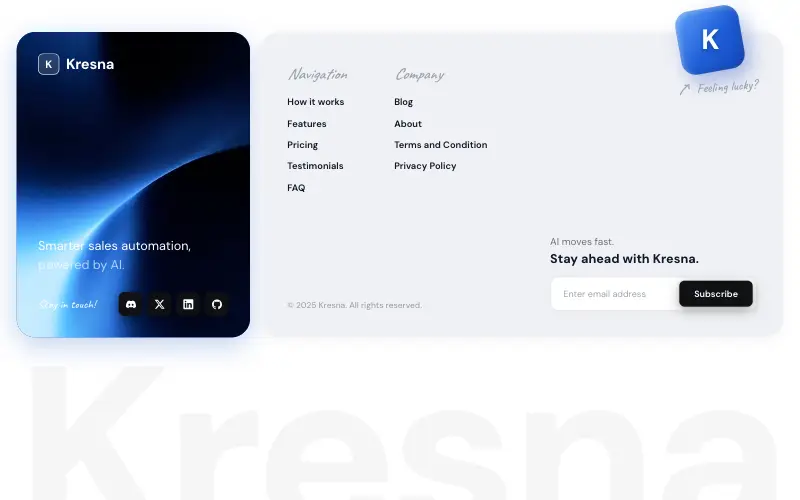
Two-card SaaS footer: a looping blue video card with logo, tagline and dark social tiles, a light link card with a tilted 'Feeling lucky?' cube breaking its top edge, and a faded wordmark fitted edge to edge.
Vectrus Energy
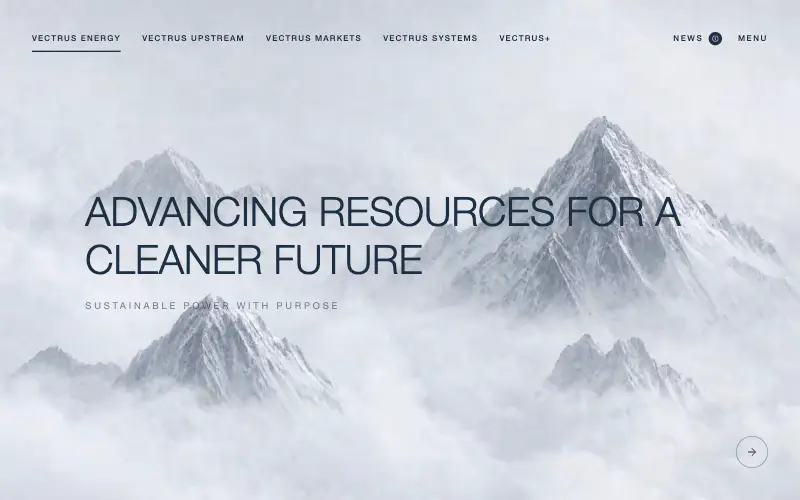
Scroll-tied cinematic section: a 500vh track scrubs an aerial clip frame by frame through a WebCodecs frame bank, with three sequential copy blocks.
Wanderful
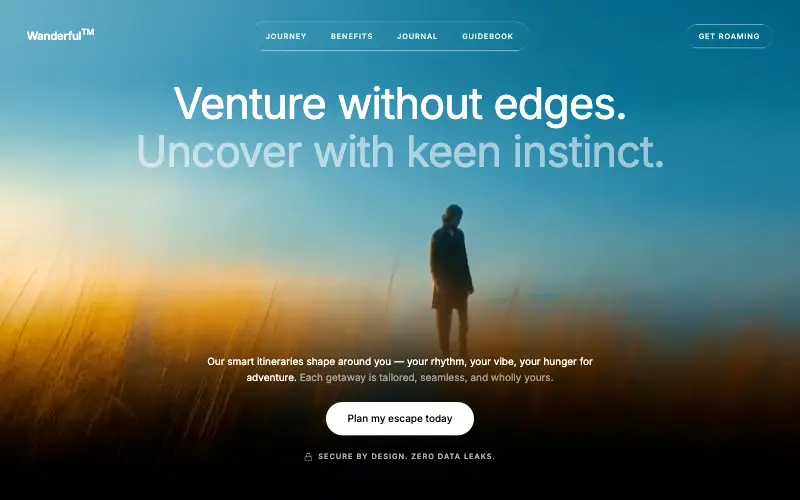
Cinematic travel hero: a full-bleed loop drifting under a GSAP mouse parallax, with a liquid-glass pill navbar and two fade-up copy blocks.
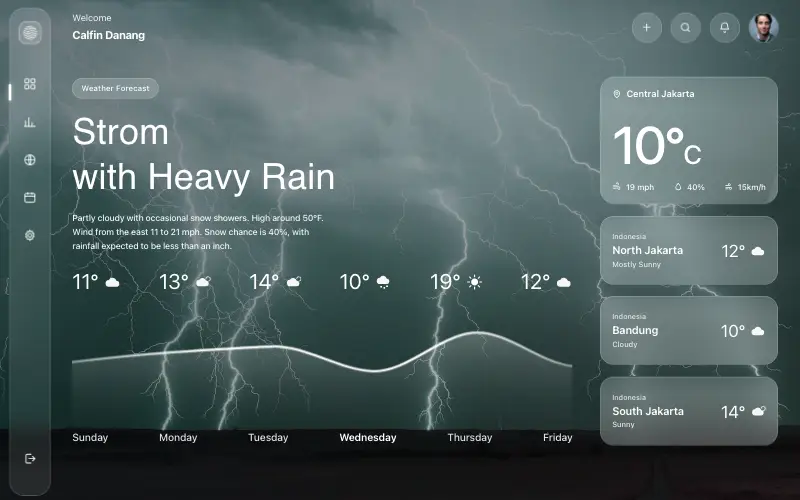
Aurora Weather Dashboard
Liquid-glass weather dashboard on a 1357x871 unit grid: frosted panels over a storm photo and a chart that draws itself, then fills.